In the evolving world of digital media, remote interviewing has shifted from an emergency workaround to an industry standard. However, traditional video-conferencing software like Zoom or Google Meet often degrades audio and video quality due to internet compression and live bandwidth fluctuations.
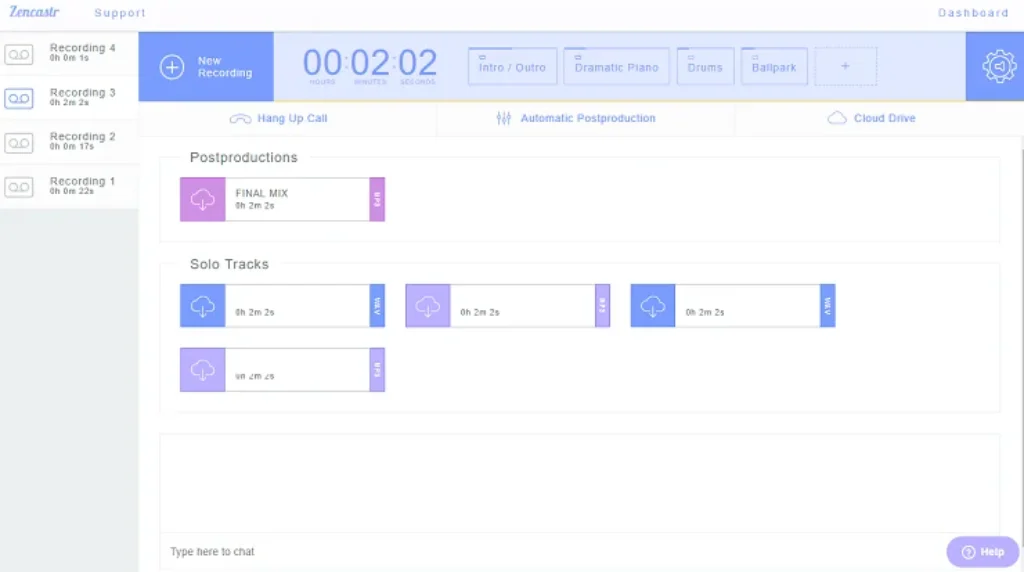
Enter Zencastr—a dedicated, web-based remote recording platform engineered to capture pristine, studio-quality audio and high-definition video directly from participants’ local browsers.
Here is an in-depth review of Zencastr, evaluating its features, performance, user experience, and overall value for content creators.
1. What is Zencastr?
Zencastr is a cloud-based podcast and video recording suite designed for creators, interviewers, and media production teams. Instead of relying on internet streams, Zencastr records each participant’s audio and video locally on their own device before uploading the uncompressed files to the cloud.
Over recent updates, Zencastr has expanded from a pure recording utility into a full all-in-one podcasting hub, integrating local multi-track recording, AI post-production, automated transcription, RSS hosting, and direct monetization tools.
2. Key Features & Highlights
🎙️ Local Double-Ended Multi-Track Recording
- Studio-Grade Quality: Captures 16-bit / 48kHz WAV audio and up to 4K video per participant.
- Isolated Tracks: Every host and guest gets their own separate audio and video tracks, providing complete freedom during post-production and audio engineering.
- Connection Resilience: Because recordings happen on local hardware, network drops or temporary lag do not ruin the recorded audio track.
👤 Frictionless Guest Onboarding
- No Downloads Required: Guests join via a simple web link using Chromium browsers (Google Chrome, Microsoft Edge, Brave) or the Zencastr iOS app.
- Automatic Hardware Checks: Before entering the recording room, Zencastr guides guests through mic, camera, and headphone setups to prevent technical glitches.
🤖 ZenAI & Automated Editing Suite
- AI Audio Enhancement: Automatic background noise reduction, hum removal, and loudness normalization.
- Filler Word & Pause Removal: Seamlessly eliminates “ums”, “ahs”, and awkward long silences with a single click.
- Text-Based Video Editing & Smart Layouts: Edit audio/video by editing the transcript, with automatic speaker-focused video switching, face centering, and eye-contact correction.
- Social Clip Generator: Automatically extracts highlight clips formatted for TikTok, YouTube Shorts, and Instagram Reels.
📻 Hosting, RSS Distribution & Monetization
- Built-in RSS Hosting: Host multiple shows with unlimited downloads and automatic distribution to Spotify, Apple Podcasts, YouTube, and Amazon Music.
- Ad Marketplace: Connects creators directly with brand sponsors via the Zencastr Creators Network to monetize episodes seamlessly.
3. Pros & Cons
| Pros (Strengths) | Cons (Limitations) |
| Pristine Quality: Uncompressed 48kHz WAV & 4K video recording. | Resource Intensive: Can push CPU/RAM limits on older laptops during long 4K sessions. |
| Separate Tracks: Independent audio/video streams for every guest. | Browser Dependency: Best performance requires Chromium-based browsers (Chrome, Edge). |
| Zero Guest Friction: No app downloads or account logins needed for guests. | Upload Dependency: Guests must keep their browser open until files upload post-session. |
| Full Lifecycle Solution: Recording, AI editing, hosting, and monetization under one roof. |
4. Pricing Overview
- Free Plan / Trial: Offers basic recording functionality for creators getting started.
- Paid Tier (Starting around $20–$24/month): Unlocks 4K video recording, uncompressed 48kHz WAV audio, unlimited ZenAI post-production credits, text-based multi-track editing, unlimited transcription, and full RSS hosting.
5. Final Verdict: Is Zencastr Worth It?
Rating: 4.6 / 5.0
Zencastr is one of the most reliable and feature-complete platforms available for podcasters and digital creators today. By combining local multi-track recording with powerful AI post-production and integrated RSS hosting, it drastically simplifies the creation workflow while delivering studio-level quality.
Whether you are launching a new podcast or upgrading an existing multi-guest show, Zencastr provides all the tools necessary to record, polish, and monetize your content efficiently